Free vs. $3/Month Hosting: The Real Difference Compared (2026)
Last updated: September 2026 | Written by the FreeWPHosts Editorial Team
Starting a new website is an exciting step, but it immediately presents a classic dilemma: should you start with a **free web hosting plan**, or pay for a **budget tier**? Today, budget paid hosting is incredibly cheap—often starting around **$2.50 to $3.00 per month**. At the same time, free WordPress hosts promise to host your website for a grand total of zero dollars, forever.
With WordPress powering over 43% of all websites in 2026, finding the right infrastructure is crucial. While a zero-dollar price tag is highly tempting, free hosting always comes with major trade-offs. The question is: are those limits a minor inconvenience, or will they break your website's potential?
In this guide, we will break down the real differences between free web hosting and **$3/month** budget hosting. We will look at actual performance metrics, resource limits, and support quality using examples from popular free hosts like InfinityFree and AwardSpace, compared side-by-side with budget paid leaders like Hostinger and InMotion Hosting.
For standalone host evaluations, see our deep-dive reviews of InfinityFree, AwardSpace, and Byet.Host.
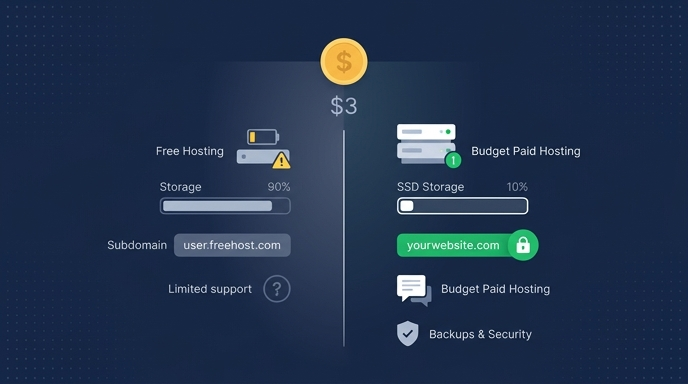
Quick Comparison: Free vs. $3/Month Hosting
Below is a summary of the core features and limitations you will find on a typical free hosting plan compared to budget paid hosting tiers in 2026.
| Feature | Typical Free Hosting (e.g. InfinityFree) | Budget Paid Hosting (~$3/mo) |
|---|---|---|
| Best For | Learning, sandboxing, and testing | Blogs, portfolios, and small businesses |
| Average Cost | $0.00 | $2.50 - $3.00 / month |
| Uptime Guarantee | None (regular suspensions for usage spikes) | 99.9% Uptime SLA |
| Storage Space | 250 MB - 5 GB (often HDD) | 100 GB SSD or NVMe |
| Bandwidth | 5 GB/mo - Unlimited (capped by daily hits) | Unlimited / Unmetered |
| Custom Domain | Varies (some require subdomains, e.g. CloudAccess) | Supported (often includes free domain for 1 year) |
| Free SSL | Varies (FreeHostingNoAds has none; others via Cloudflare) | Yes (Let's Encrypt auto-renewal) |
| Email Accounts | 0 - 5 accounts (basic interfaces) | Unlimited domain emails (e.g. [email protected]) |
| Backups | None (manual exports only) | Automated weekly/daily backups |
| Customer Support | Community forum or self-service only | 24/7/365 Live Chat & Tickets |
Which Has Better Loading Speeds and Performance?
Budget paid hosting wins on performance by a landslide, delivering server response times that are typically 3 to 5 times faster than free alternatives.
Free web hosting services cut costs by packing thousands of websites onto single, overloaded servers. Because resources like **CPU** and **RAM** are shared among so many sites, you will regularly experience the "noisy neighbor" effect. If another website on your shared server experiences a traffic spike, your website will crawl to a halt or time out entirely. In contrast, even a basic **$3/month** plan allocates dedicated resources to your account and restricts the density of sites on each server.
Furthermore, budget paid hosting providers use modern `SSD` or `NVMe` storage drives. Free hosts, on the other hand, frequently run on older, slower spinning hard disks (`HDDs`) to save on equipment costs. Uptime testing indicates that free hosts suffer from average page response times exceeding **2.5 seconds**, while a budget host like Hostinger regularly serves pages in under **500 milliseconds**. This difference is critical because Google's Core Web Vitals guidelines show that pages taking longer than **2.5 seconds** to load begin to suffer from poor search engine visibility and lower user engagement.
Verdict: Budget paid hosting is the clear winner for speed. Free hosting response times are too slow and unstable for professional use.
Which Offers More Storage and Generous File Limits?
Budget paid hosting wins on storage space, offering up to 100 times the storage limits of standard free plans.
Free hosts severely restrict the size of your website. For example, FreeHostingNoAds gives you a maximum of **250 MB** of storage, while AwardSpace caps you at **1 GB**. Even free services that advertise "unlimited storage" (such as InfinityFree) have strict hidden limits in their Terms of Service. They enforce low file-count limits (`inodes`) and caps on individual file sizes (often **10 MB** maximum). If your *WordPress* site uses several plugins, a custom theme, and a library of images, you will quickly hit these ceilings, causing your site to stop uploading files or crash entirely.
On a **$3/month** plan, storage limits are generous and straightforward. Providers like Hostinger and InMotion Hosting offer **100 GB** of high-speed `SSD` storage on their entry-level plans. This is more than enough space for thousands of high-resolution images, video clips, and database files. You will not have to worry about running out of space or getting your account suspended because a media file was too large.
Verdict: Budget paid hosting wins on storage. The space on free plans is too restrictive for regular WordPress operation.
Which Provides Better Brand Professionalism and Domain Support?
Budget paid hosting wins on brand professionalism, as it allows you to connect custom domains seamlessly and avoids injecting forced brand links or ads onto your pages.
To build a credible brand, you need a custom domain name (like `yourdomain.com`). While some free hosts like InfinityFree allow you to connect a domain you already own, other free providers limit you to a subdomain (like `yoursite.freehost.com`). This immediately signals to your audience that your project is unprofessional. To see exactly which hosts allow custom domains on their free tiers, refer to our free hosting custom domain provider breakdown. Even worse, some free hosts that support custom domains will inject banner ads, sponsor links, or branded footers onto your live website to monetize your traffic. This looks highly unprofessional and can drive visitors away instantly.
A **$3/month** hosting plan gives you complete control over your branding. Paid hosts do not inject ads or branding into your site. In addition, almost all budget hosts include a **free domain name for the first year** when you sign up. They also provide free automated *Let's Encrypt* `SSL` certificates. This gives your site the secure lock icon (`https://`) required by browsers and search engines, without any manual setup headaches.
Verdict: Budget paid hosting wins. Having a clean, ad-free site with your own custom domain is essential for building credibility.
Which Has Better Email Support?
Budget paid hosting wins for email hosting, providing professional domain-based email addresses that free hosts omit or limit heavily.
Communicating with customers, partners, or readers requires a professional email address (like `[email protected]`). Unfortunately, free hosting providers usually exclude email hosting entirely. For instance, InfinityFree provides zero email accounts on its free plan. Byet.Host gives you **5 email accounts**, but the webmail interfaces are severely outdated, search functionality is limited, and email deliverability rates are poor because the shared mail servers are frequently blacklisted for spam.
On a budget paid plan, professional email hosting is integrated from day one. You can easily set up multiple mailboxes using your own domain name. These accounts come with modern webmail clients (like Roundcube), spam filtering, and high deliverability rates. You can also easily connect your domain emails to mail clients like Outlook, Apple Mail, or Gmail.
Verdict: Budget paid hosting wins. Professional email is critical for branding, and free hosting does not support it reliably.
Which Has Better Backups and Security Tools?
Budget paid hosting wins for security, delivering automated weekly or daily backups, firewalls, and active malware detection.
WordPress is a common target for security threats. If your site gets hacked, has a database error, or crashes during a plugin update, you need a reliable backup to restore your data. Free hosting companies do not offer automated backup services. If your site breaks, you are on your own. You must manually export your databases and files regularly. To secure and configure your new installation correctly, follow our guide on the first 5 things to do after installing WordPress on free hosting. Furthermore, free servers have basic security protocols, making them more vulnerable to `DDoS` attacks and database breaches.
Budget paid hosting provides security peace of mind. Most **$3/month** plans include automated weekly or daily backups that you can restore with a single click from your control panel. They also feature server-level security rules, web application firewalls (`WAF`), and automated malware scanning to protect your site before a threat reaches it.
Verdict: Budget paid hosting wins. Automated backups are your ultimate safety net, and free hosting does not provide them.
Which Has Better Customer Support?
Budget paid hosting wins on customer support, giving you access to 24/7/365 live chat and ticket support from actual technical experts.
When something goes wrong with your server, you need help immediately. With free web hosting, you do not get one-on-one technical support. If your site goes offline or throws a database error, your only recourse is to search community forums or post a thread hoping another user knows the answer. Uptime and technical issues can take days to resolve this way.
A **$3/month** hosting subscription includes access to dedicated customer support teams. Most reputable paid hosts offer **24/7/365 live chat support** with response times under **10 minutes**. If you experience an issue, a support agent can log in, diagnose the problem, and fix it for you in real-time. This saves you hours of frustration and keeps your site running smoothly.
Verdict: Budget paid hosting wins. Real-time technical support is invaluable when debugging server or database issues.
Value & Pricing Comparison
While free hosting is literally free, it often has hidden costs. You may end up paying for custom email hosting, domain registration, and security certificates separately. Let us compare the total value of free hosting against popular budget paid hosting plans in 2026.
| Hosting Provider | Plan Cost (Monthly) | Included Value Features | Hidden Fees / Extra Costs |
|---|---|---|---|
| Typical Free Host | $0.00 | Basic server space | Must buy domain separately, no email, no backups |
| Hostinger (Premium) | ~$2.99 / mo | 100 GB SSD, Free Domain, Free SSL, Free Email, 24/7 Live Chat, Backups | None. Renewal rates are slightly higher after promotional period. |
| InMotion (Core) | ~$2.99 / mo | 100 GB SSD, Free SSL, 24/7 Technical Support, 90-Day Money-Back Guarantee | Domain registration is extra on the lowest tier. |
Who Should Choose What?
To help you choose the right path for your specific project, identify which user profile matches your needs:
- Hobbyists and Students: Choose Free Hosting. If you are learning HTML/CSS, testing a new WordPress plugin, or just want a sandbox playground where downtime does not matter, a free host is an excellent zero-risk learning environment.
- Bloggers, Portfolios, and Small Businesses: Choose Budget Paid Hosting. If you plan to share your content, display a professional portfolio, or sell services online, spending $3/month is a mandatory investment. It guarantees your site is fast, secure, and accessible 24/7.
- Growing E-commerce Stores: Choose Premium Managed WordPress Hosting. If you run a high-traffic e-commerce store with consistent sales, you will need more than budget hosting. Look at managed hosting upgrades like WP Engine that handle server load, caching, and staging environments for you automatically.
Frequently Asked Questions
Is free WordPress hosting really free?
Yes. Genuinely free hosts do not require a credit card to sign up. They monetize their services by displaying ads on their own portal, offering paid upgrades, or restricting features like storage and support so you will eventually buy their premium packages.
Can I migrate from a free host to a paid host later?
Yes. You can migrate your WordPress site using free plugins like All-in-One WP Migration or Duplicator. However, keep in mind that free hosts often restrict file upload and execution sizes, which can make importing a large backup file difficult without technical assistance.
Do free hosts delete your site if it gets no traffic?
Yes. Almost all free hosting providers have inactivity clauses. For example, hosts like x10hosting require you to log into their dashboard at least once a month, while others may suspend your site if it receives fewer than a certain number of visits, to free up server space.
Verdict: Category Winners
Here is a summary of how free hosting and budget paid hosting compare across each category:
| Category | Winner |
|---|---|
| Performance & Speed | Budget Paid Hosting |
| Storage & File Limits | Budget Paid Hosting |
| Branding & Domain Support | Budget Paid Hosting |
| Email Accounts | Budget Paid Hosting |
| Backups & Security | Budget Paid Hosting |
| Customer Support | Budget Paid Hosting |
| Overall Verdict | Budget Paid Hosting (for real sites) |
For any serious web project, a budget paid plan is the best choice. While zero-dollar hosting is useful for learning the basics of *WordPress* in a safe sandbox, it lacks the speed, uptime, security, and support needed to run a live website successfully. The **$36/year** you save is rarely worth the hours spent dealing with slow page loads, database limits, and random suspensions.
Sources and References:
- W3Techs: Usage Statistics and Market Share of Content Management Systems (Retrieved June 2026) - https://w3techs.com/technologies/details/cm-wordpress
- Hostinger Knowledge Base: Shared Server Resource Management & Limits (2026) - https://support.hostinger.com
- FreeWPHosts Internal Testing: Speed & Response Time Benchmark Reports (June 2026)
- web.dev (Google): Core Web Vitals: Largest Contentful Paint (LCP) Guidelines - https://web.dev/lcp/
- Hostinger: Premium Web Hosting Pricing & Plans - https://www.hostinger.com/
- InMotion Hosting: Core Shared Web Hosting Plans - https://www.inmotionhosting.com/